2. Protect
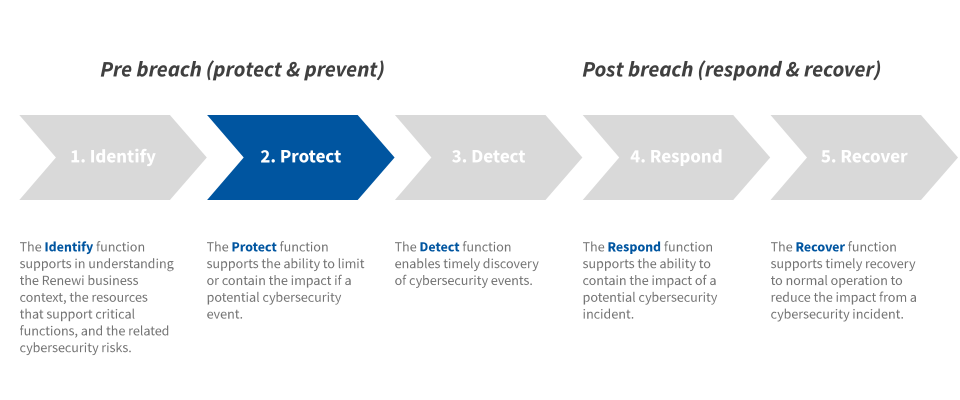
The Protect Function supports the ability to limit or contain the impact of a potential cybersecurity event.
2.1. Identity Management and Access Control
Attackers frequently discover and exploit legitimate but inactive user accounts to impersonate legitimate users. Accounts of contractors and employees who have been terminated (but where account were not deleted afterwards) are often misused in this way. Additionally, malicious insiders or former employees may access accounts that are left behind in a system long after contract expiration, maintaining their access to Renewi’s systems and information for unauthorized and sometimes malicious purposes.
Renewi therefore actively manages the life cycle of system and application accounts – their creation, use, dormancy, deletion – in order to minimize opportunities for attackers to leverage them.
Key principles:
Identification
Determining a user's identity. The following requirements apply for the logon process:
- Identities need to be saved and managed in a central Identity Store (e.g. Active Directory)
- It has to be possible to trace accounts back to identified individuals. Functional accounts (not directly related to individuals) are permitted by way of exception (e.g. weighbridge accounts)
- Supplier accounts need to comply with the setup for internal employees, but in addition need to have a unique identifier (e.g. naming convention or separate active directory OU) and an ‘expiration date’ needs to be entered based on the end date of the agreement.
- Accounts for externals (i.e. not suppliers but contractors, projects, etc.) need to be set up in accordance with suppliers. These externals need to be separately ‘flagged’ in the central Identity Store and an end date and owner must be assigned;
- Accounts are automatically blocked after 5 months of inactivity;
- Accounts for externals may only have access to the systems when requirements in paragraph ‘1.3 Supply Chain Management’ are met.
Authentication
Determining whether the person is effectively the person he/she is claiming to be. To prove a user's claimed identity, appropriate authentication techniques are applied by Renewi. The following requirements apply:
- Where possible, authentication has to be based on the central Identity Store;
- Specifically for applications, authentication should be done via ‘single sign on’ if possible;
- Multi-factor authentication and encrypted channels should be used for all administrative account access and access to cloud/online environments;
- Passwords should be changed at the first time a user logs on to the system;
- Also after a password reset, the password should be changed at the first logon;
- Default and installation passwords are removed or changed during or directly after installation;
- Various authentication mechanisms apply to different types of identities:
- Regular accounts (1);
- Administrator accounts (2);
- Service accounts (3);
- Functional accounts (4).
- Authentication mechanisms for regular accounts
- Authentication mechanisms for administrator accounts
- Authentication mechanisms for Service accounts
- Authentication mechanisms for Functional accounts
Functional accounts are accounts that are generic and cannot be traced back to individuals. Renewi tries to avoid such accounts but in certain situations such accounts are needed. Examples include batch accounts, service accounts or weighbridge accounts.
Regular accounts concern the accounts of Renewi’s end-users, including externals and suppliers (not active in system administrator positions). Regular accounts need to authenticate with a password, a PIN code or a biometric option, where best practice requirements are applied.
Administrator accounts are the powerful accounts (domain administrators, local administrators, enterprise administrators, scheme administrators) required to gain access to operating systems, databases and other infrastructural components. Administrator account may only be used for specific work that needs the extra privileges and not for any other work. This means that people using these accounts must have a regular user account and use that account for most of their work. Administrator accounts need to authenticate with a password. The requirements have to comply with the password requirements for regular accounts (see 2.1), with extra supplementary requirements.
Service accounts are the accounts that perform automated tasks in systems, networks and applications (e.g. Windows service tasks, jobs, etc.). The password requirements need to comply with the password requirements for management administrator accounts.
Authorization
Determining whether the authenticated identity is entitled to access certain systems and applications. Once users are authenticated, access must be authorized. The following requirements apply:
- Access to systems and applications are assigned, mutated and revoked based on Renewi’s general access management procedure;
- User access rights are reviewed periodically by respective data and/or system owners